Point at it, and it becomes a task
Web projects get a live preview inside Vanel, at desktop or phone width. Click anything in it to leave a comment, and the team takes it up as a task.

Vanel gives you a team of AI helpers that builds apps and websites for you. Tell the Leader what you want in plain words. The team plans, builds and tests it, and saves a version only when every check passes.
Works with the AI you already have: ClaudeChatGPTOpenCode

Four steps, all in plain words. You never see a terminal, and you only see code if you ask to.
Start from a ready-made team for what you want: an app, a shop, a YouTube channel, a study plan.
Say what you want in your own words. The Leader asks only when it really needs to, with simple options to choose from.
The Planner splits the work into tasks and the Developer builds it. You see who is doing what, and your app in a live preview.
The Tester runs every check and the Reviewer looks the work over. A version is saved only when all checks pass; then you approve it or ask for changes.
17 teams to start from: 16 ready-made ones in four groups, and a blank one you shape yourself. Each one knows its job and works in your language.
From a one-page site to a full web app.
Your team does the work. You see all of it, and every decision that matters comes back to you.
Web projects get a live preview inside Vanel, at desktop or phone width. Click anything in it to leave a comment, and the team takes it up as a task.
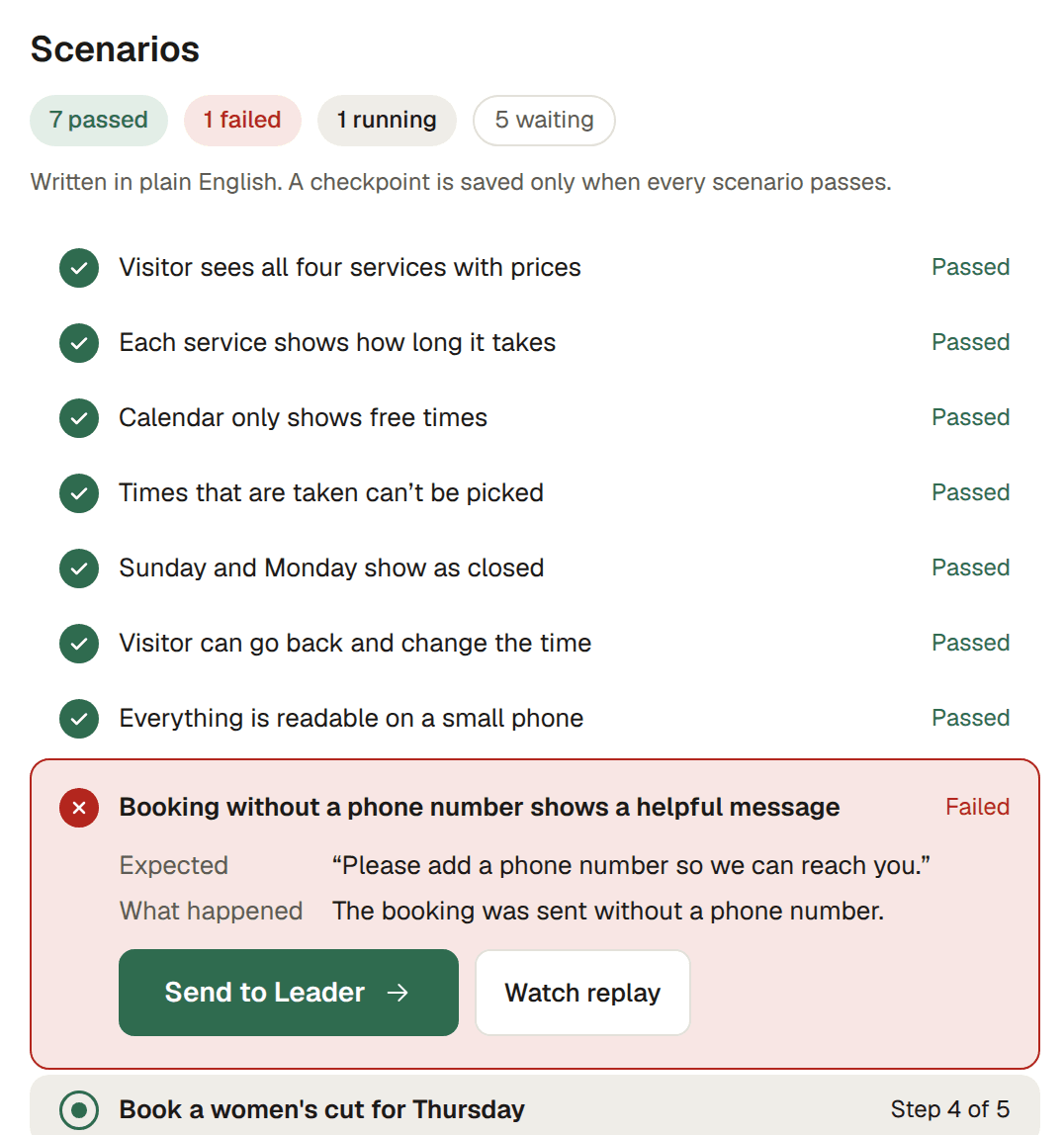
Every feature comes with checks written in plain words, such as “Visitor sees all four services with prices”. The Tester runs them on your app, and you can watch every run live. A version is saved only when every check passes; when one fails, the work goes back to the team, not to you.

Finished versions stay on file, newest on top. Going back to one never deletes anything: the version you have now stays in the list, so you can switch back at any time.
Team rules
Your preferences and decisions are kept in plain words you can read, change or delete. Tell it once and it sticks.
Vault
Stripe key
The key itself stays hidden.
Never sent to the AI or the logs
Passwords and keys go into a vault on your computer, never into the chat. They never reach the AI or the logs.
Schedules
Weekly bookings summary
Repeats every week
Ask for something to happen later or every week, like “send me a bookings summary every Friday”. Your team does it on time.
Your team stops before paying for anything, sending emails, messages or posts, publishing, or deleting things. The Leader hands that step to you and waits. At a payment page it never types card details.
Your turnAlways handed to you

Every screen on this page is the real Vanel app, in its built-in demo.
Vanel works with your own AI account. You sign in on the provider’s own page, and they bill you as usual. Vanel never resells AI or adds a markup.
Billed by your provider, as usual
No AI subscription yet? Setup explains your options in plain words.
Just looking? Vanel’s demo opens a finished sample project without any AI account.
Something else? Write to support@getvanel.com.
No. You describe what you want in everyday words. Vanel never shows you a terminal, and you only see code if you ask to.
A computer with Windows, macOS or Linux, and an AI subscription such as Claude or ChatGPT. If you don’t have one yet, setup walks you through the options.
No, and that’s on purpose. Your team runs on your own AI plan, which your provider bills directly. Vanel’s price covers the app, so there is never a markup on your AI usage.
On your computer. Your projects, your team’s memory and your vault stay on your machine. We only receive anonymous usage statistics, which you can turn off, and problem reports you choose to send.
No. Important actions such as paying, sending emails or posts, publishing, or deleting things always stop and wait for you. At a payment page, the team hands over and says “Your turn”.
Free gives you one active project with a basic team. Pro unlocks unlimited projects and teams, every template, schedules and more. Lifetime is Pro, paid once, for the first 300 people.
Yes. Cancel Pro from your account page in two clicks. You keep Pro until the end of the period you already paid for.
Your team works in the language you start it in, and remembers things in that language too. The app itself is available in English and Turkish.
Download Vanel free and lead your first team today. No account needed to start.
Free to start. For Windows, macOS and Linux.