Skip to content
Test modeTest mode: payments are simulated and no card is ever charged.

You lead. The team does the work.

Vanel gives you a team of AI helpers that builds apps and websites for you. Tell the Leader what you want in plain words. The team plans it, builds it and tests it, and a version is saved only when every check passes.

Free to start. For Windows, macOS and Linux.

A request on its way: the salon’s booking page should show only the free times. The Leader prints it as a ticket; the Planner, Developer, Tester and Reviewer each work on it in turn; at the pass all 14 checks pass and it is saved as version 7.
Leader

VANELNo. 0147

From: youTo: Leader

Salon booking page: show only the free times in the calendar.

  1. PlannerPlanned
  2. DeveloperBuilt
  3. Tester14/14 pass
  4. ReviewerReviewed
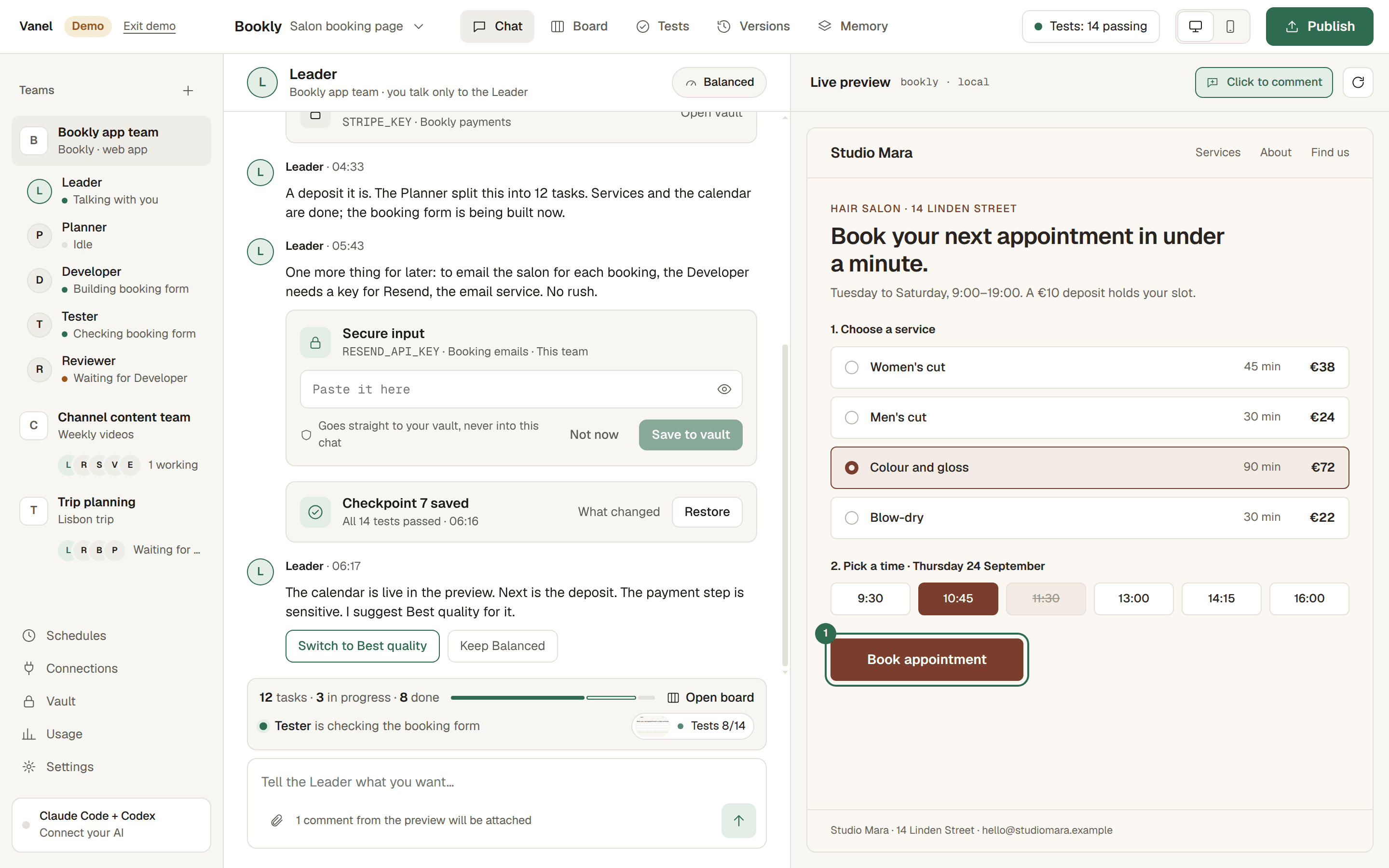
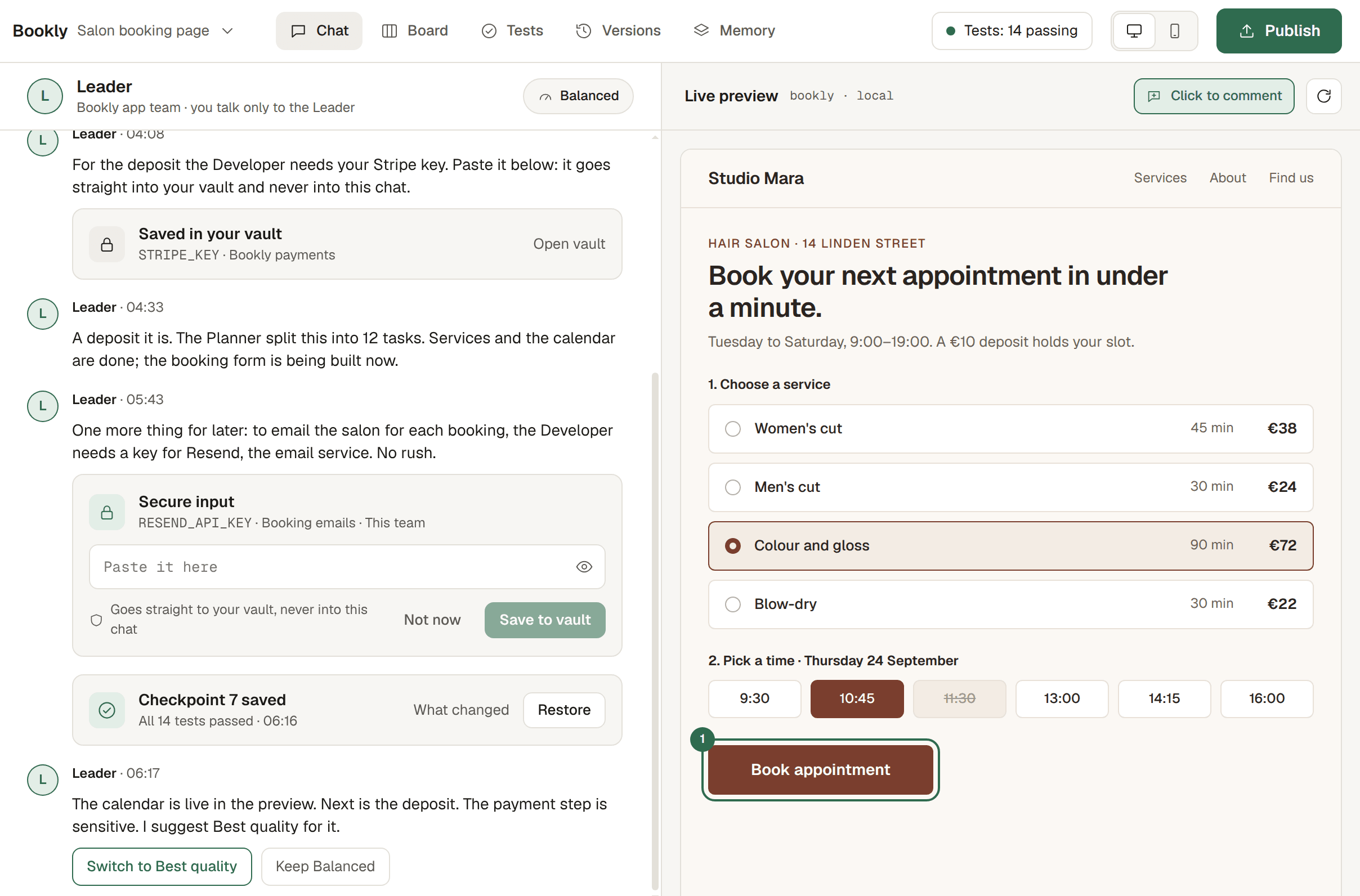
Vanel with the sample project Bookly open. In the chat with the Leader, checkpoint 7 has just been saved with all 14 tests passed, and the Leader says the calendar is live. Next to it, the live preview of the Studio Mara booking page, where a time that is already booked cannot be picked.

CheckedVersion 7

The real app, in Vanel’s built-in demo: checkpoint 7 saved with all 14 checks passed, and the calendar live in the preview.

You talk to one Leader. The whole team gets to work.

This is Vanel as it really looks, with the demo’s sample project open. Four steps, all in plain words.

Vanel’s workspace: your teams and the Bookly team’s members on the left, the chat with the Leader in the middle, and the live preview of the booking page on the right.
  1. Pick a team

    Start from a ready-made team for what you want: an app, a shop, a YouTube channel, a study plan.

  2. Tell the Leader

    Say what you want in your own words. The Leader asks only when it really needs to, with simple options to choose from.

  3. Watch it take shape

    See who is doing what, and your app itself in a live preview. Click anything in it to leave a comment.

  4. Approve what passes

    A version is saved only when all of its checks pass. Look it over, ask for changes or approve it.

A team for almost anything

19 ready-made teams in four groups. Each one knows its job and works in your language.

  • Build an app5 teams

    • Web App Team

      Builds a full web app for you

    • Quick Build

      A simple app, fast and cheap

    • Careful Build

      Extra checks before each save

    • Landing Page Team

      One page that sells your idea

    • Fix My App

      Finds and fixes what’s broken

  • Create content6 teams

    • YouTube Channel Team

      Ideas, scripts and thumbnails

    • Short-form Video Team

      Scripts for Reels and Shorts

    • Social Media Team

      A week of posts in your voice

    • Podcast Team

      Episode plans and show notes

    • Blog & SEO Team

      Articles people can find

    • Newsletter Team

      A regular email worth opening

  • Business5 teams

    • Market Research Team

      Who buys, who competes, and why

    • Launch Team

      A plan to get your first users

    • Pitch Deck Team

      A clear deck for investors

    • Online Store Team

      A shop with product pages

    • Customer Support Kit

      Replies and help pages

  • Personal2 teams

    • Study Buddy Team

      Learn anything, step by step

    • Job Hunt Team

      CV, letters and interview prep

    Blank Team

    Nothing fits? Start empty and describe what you need. The Leader builds the team with you.

Nothing is saved until it passes

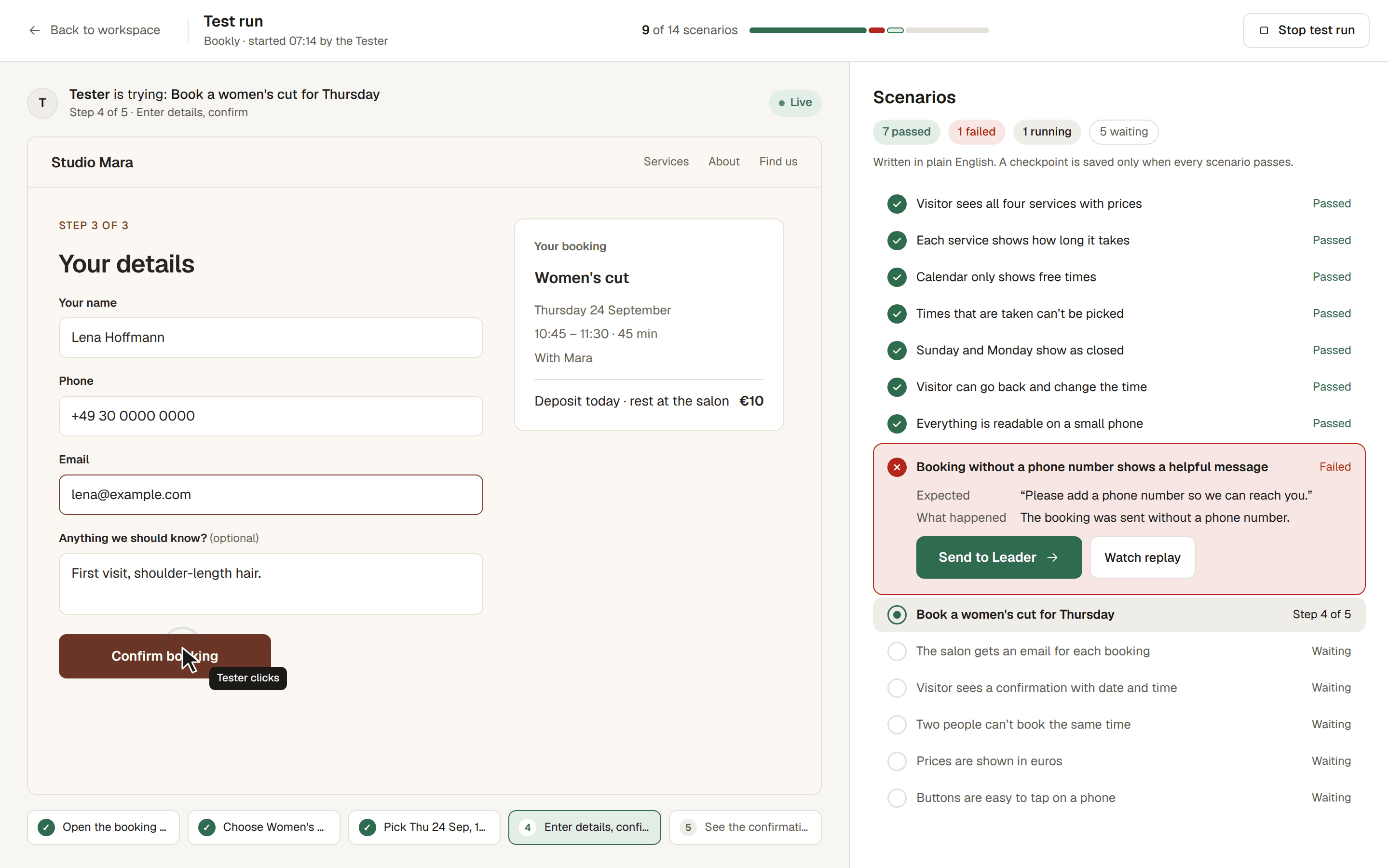
Every feature comes with checks written in plain words, such as “Visitor sees all four services with prices”. The Tester runs them on your app, and you can watch every run live. A version is saved only when every check passes; when one fails, the work goes back to the team, not to you.

A test run in Vanel: the Tester fills in the Bookly booking form while the list of checks fills in. Seven checks passed and one failed, because booking without a phone number showed no helpful message. It can be sent straight to the Leader.
A live test run in the demo. One check failed, so nothing was saved and the work went back to the Leader.

Every saved version is kept

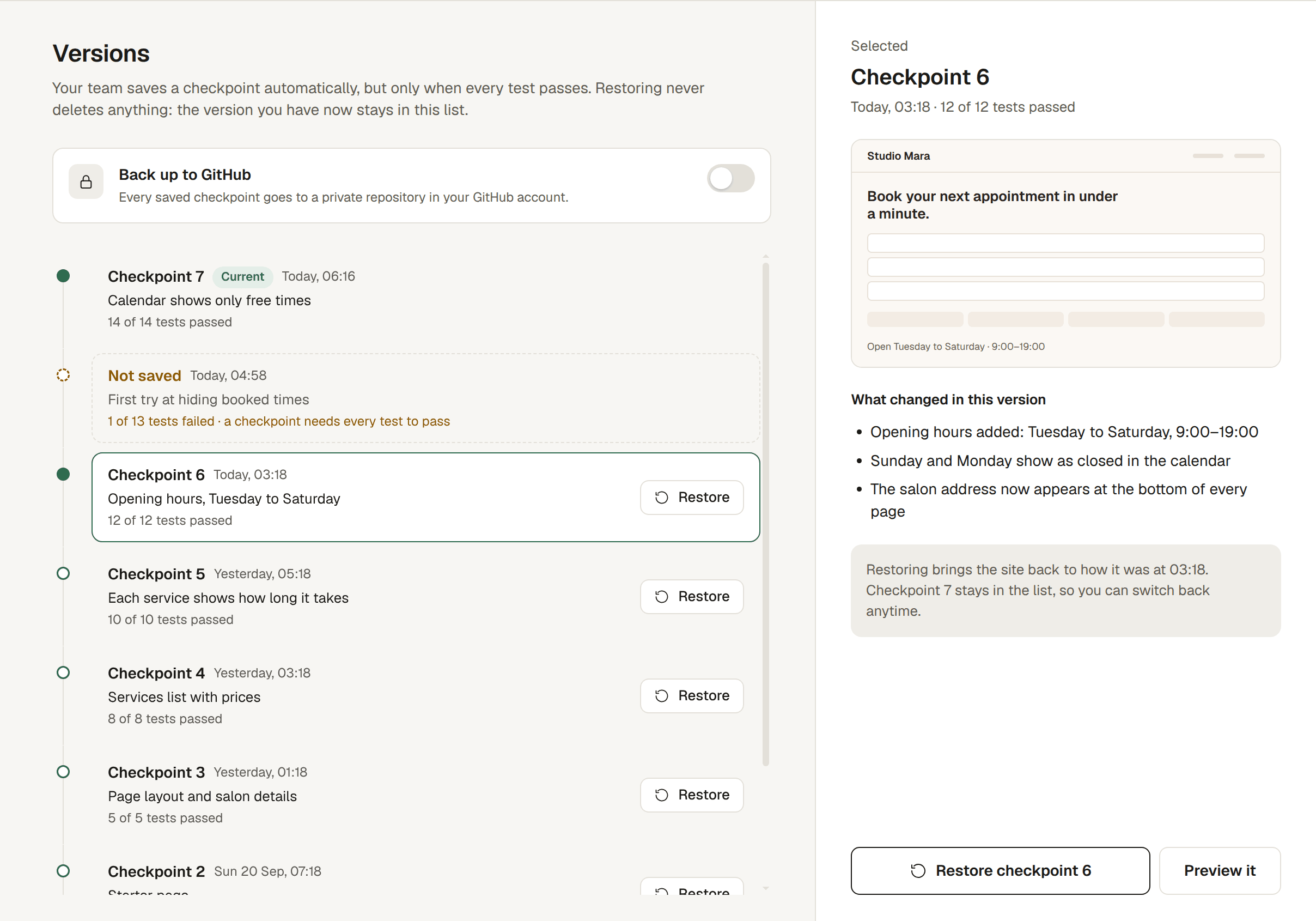
Finished versions stay on file, newest on top. Going back to one never deletes anything: the version you have now stays in the list, so you can switch back at any time.

Bookly’s saved versions, newest first

  1. No. 7Calendar shows only free times14/14 passed
  2. No. 6Opening hours, Tuesday to Saturday12/12 passed
  3. No. 5Each service shows how long it takes10/10 passed
  4. No. 4Services list with prices8/8 passed
  5. No. 3Page layout and salon details5/5 passed
  6. No. 2Starter page2/2 passed
  7. No. 1Project createdNo checks yet

First try at hiding booked times12/13 passed

Not saved

The Versions screen in Vanel: Bookly’s saved checkpoints, newest first, each with how many tests passed, and one try that was not saved because a test failed.
The same record in the app: every version you can go back to.

Anything you can’t undo comes back to you

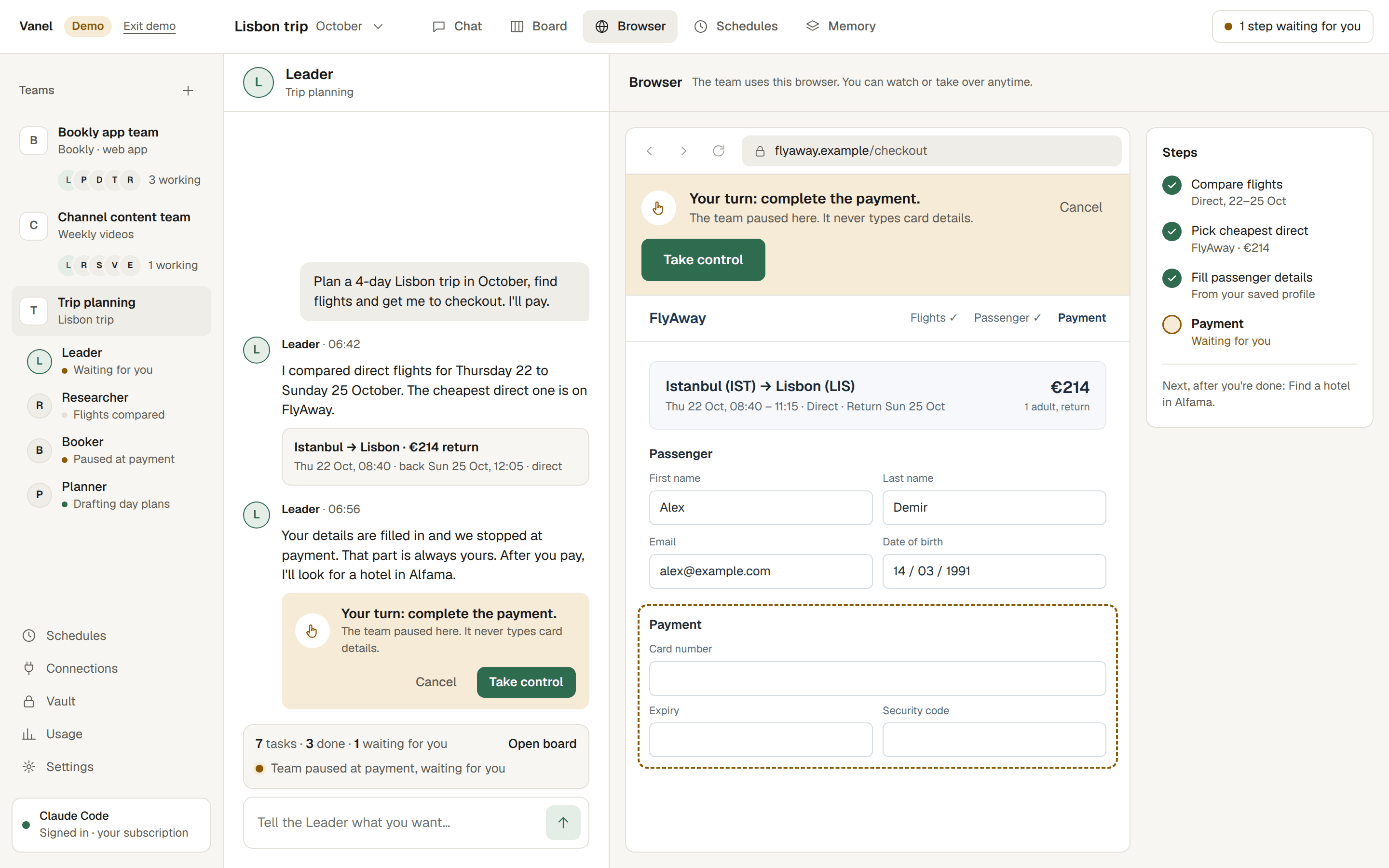
Your team stops before paying for anything, sending emails, messages or posts, publishing, or deleting things. It hands that step to you and waits. At a payment page it never types card details.

Always handed to you

  • Paying for anything
  • Emails, messages and posts
  • Publishing
  • Deleting things

Your turn

The team’s browser in Vanel, stopped at a flight checkout with the note: “Your turn: complete the payment. The team paused here. It never types card details.”
The demo’s trip-planning team, stopped at the payment step.

What your team keeps for you

Team rules

  1. Always ask before changing prices.
  2. Every page must be easy to use on a phone.
  3. Never delete client bookings or client details.

It remembers

Your preferences and decisions are kept in plain words you can read, change or delete. Tell it once and it sticks.

Stripe key

Used for: Bookly payments

The key itself stays hidden.

Keys stay locked

Passwords and keys go into a vault on your computer, never into the chat. They never reach the AI or the logs.

Every Friday, 18:00

Weekly bookings summary

Repeats every week

Work on a schedule

Ask for something to happen later or every week, like “send me a bookings summary every Friday”. Your team does it on time.

Runs on the AI you already have

Vanel works with your own AI account. You sign in on the provider’s own page, and they bill you as usual. Vanel never resells AI or adds a markup.

No AI subscription yet? Setup explains your options in plain words.

Just looking? Vanel’s demo opens a finished sample project without any AI account.

Who you pay, and for what

Your AI usePaid to your provider

  • Claude by Anthropicyour Claude plan
  • ChatGPT and Codex by OpenAIyour ChatGPT plan
  • OpenCode open sourcemany providers, including pay-as-you-go keys

Vanel, the appFree, Pro or Lifetime

Markup on your AI use$0.00
Questions

Do I need to know how to code?

No. You describe what you want in everyday words. Vanel never shows you a terminal, and you only see code if you ask to.

What do I need to get started?

A computer with Windows, macOS or Linux, and an AI subscription such as Claude or ChatGPT. If you don’t have one yet, setup walks you through the options.

Is AI usage included in the price?

No, and that’s on purpose. Your team runs on your own AI plan, which your provider bills directly. Vanel’s price covers the app, so there is never a markup on your AI usage.

Where do my projects live?

On your computer. Your projects, your team’s memory and your vault stay on your machine. We only receive anonymous usage statistics, which you can turn off, and problem reports you choose to send.

Will my team spend money or send messages without me?

No. Important actions such as paying, sending emails or posts, publishing, or deleting things always stop and wait for you. At a payment page, the team hands over and says “Your turn”.

What’s the difference between Free, Pro and Lifetime?

Free gives you one active project with a basic team. Pro unlocks unlimited projects and teams, every template, schedules and more. Lifetime is Pro, paid once, for the first 300 people.

Can I cancel anytime?

Yes. Cancel Pro from your account page in two clicks. You keep Pro until the end of the period you already paid for.

Which languages does my team speak?

Your team works in the language you start it in, and remembers things in that language too. The app itself is available in English and Turkish.

Tell the Leader what you want. The team takes it from there.

Create your free account, download Vanel and lead your first team today.

Free to start. For Windows, macOS and Linux.